Caregiver Tools

LightWell Care caregiver tools: what do you need help with today?

Choose the situation that is in front of you. LightWell Care helps you sort through it and figure out a practical next step. Support available in 22+ languages.

You'll continue to the secure LightWell Care assistant app, where a separate free login is required.

Pick the situation in front of you

Each card opens the assistant set up for that task. You can switch to any of the tools inside once you're there — nothing is locked.

  • Start here

    Figure out what to do next

    Make sense of a confusing situation, a document, or a decision — and leave with a practical next step and the right person to contact.

  • Get ready for a conversation

    Questions, talking points, and a short script before an appointment, a phone call, or a hard family conversation.

  • Organize and communicate

    Turn appointments, errands, and responsibilities into a plan you can keep up with — and turn what happened into a clear family update.

  • Organize care on paper

    Use the free printable Care Journal for daily notes, appointments, questions, emergency information, and family updates.

    Get the free Care Journal

    Free. No account needed.

  • I need emergency information

    Open the Emergency Quick Guide.

You'll continue to the secure LightWell Care assistant app, where a separate free login is required.

What's inside once you're in

Picking a card above opens the assistant to that task. From there you can switch between any of these at any time — you don't have to know which is “right,” and all of them are free during Founding Member access.

  • Decide what to do next

    Walks through your situation step by step and ends with one clear next step.

  • Prepare for a care conversation

    Generates questions and a short script tailored to who you're talking to.

  • Write a message or update

    Turns your notes into a clear message to family, a doctor's office, or an insurer.

  • Organize care

    Turns appointments, errands, and responsibilities into a plan you can keep up with.

  • Know who to ask

    Tells you whether to call the doctor, pharmacist, insurer, or social worker for a specific question.

  • Pause & reset

    A short guided break when caregiving feels like a lot.

  • Talk through how I'm feeling

    A supportive space for stress, frustration, or hard feelings.

Not sure where to start? “Decide what to do next” is the one most caregivers open first.

See LightWell Care in action

Choose what you need help with, describe what is happening, and get something practical back.

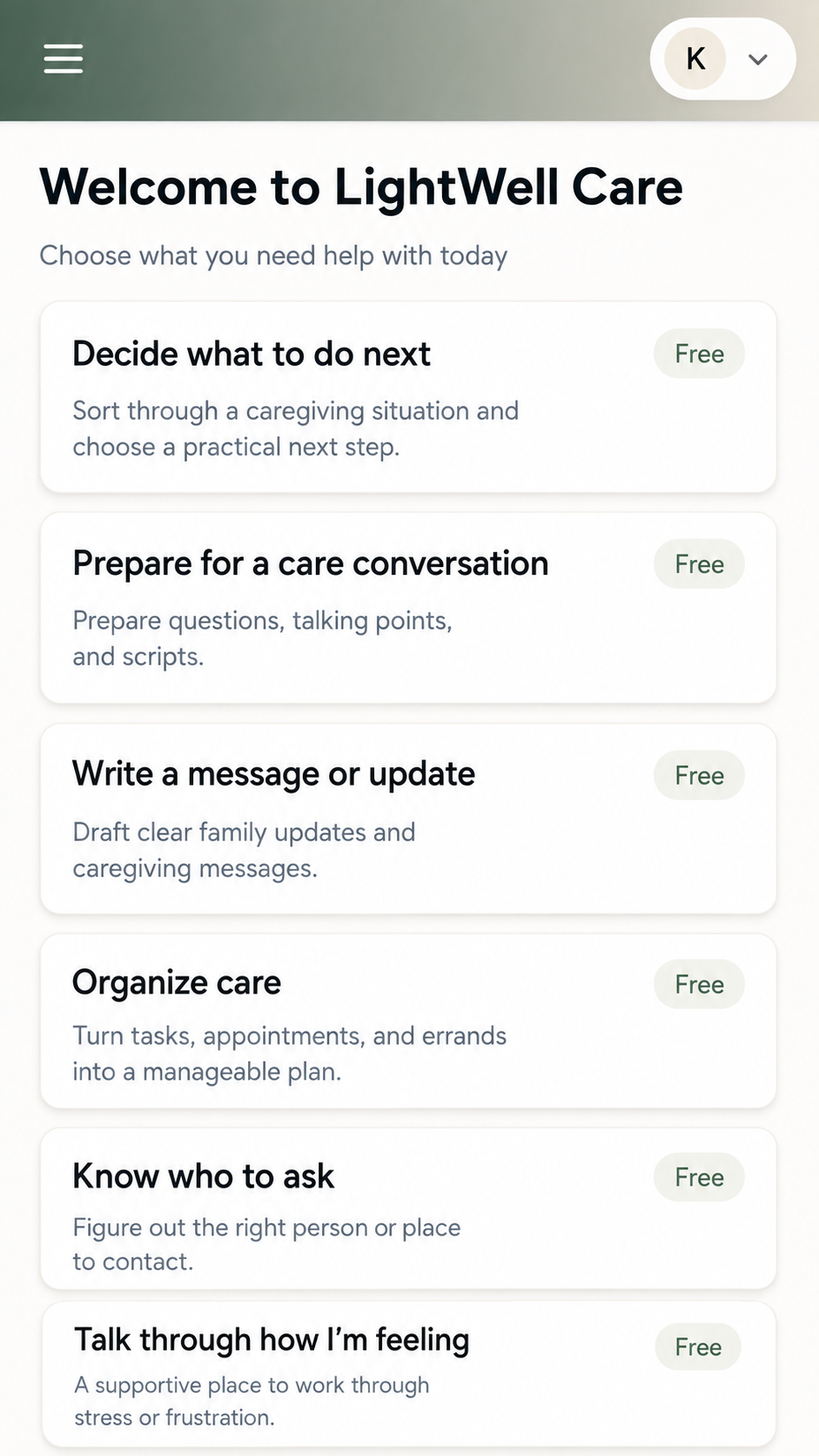
  1. 1. Choose

    LightWell Care menu on a phone listing caregiver options: decide what to do next, prepare for a care conversation, write a message or update, organize care, know who to ask, and talk through how I am feeling
    Pick the job in front of you — no setup, no account required to look.
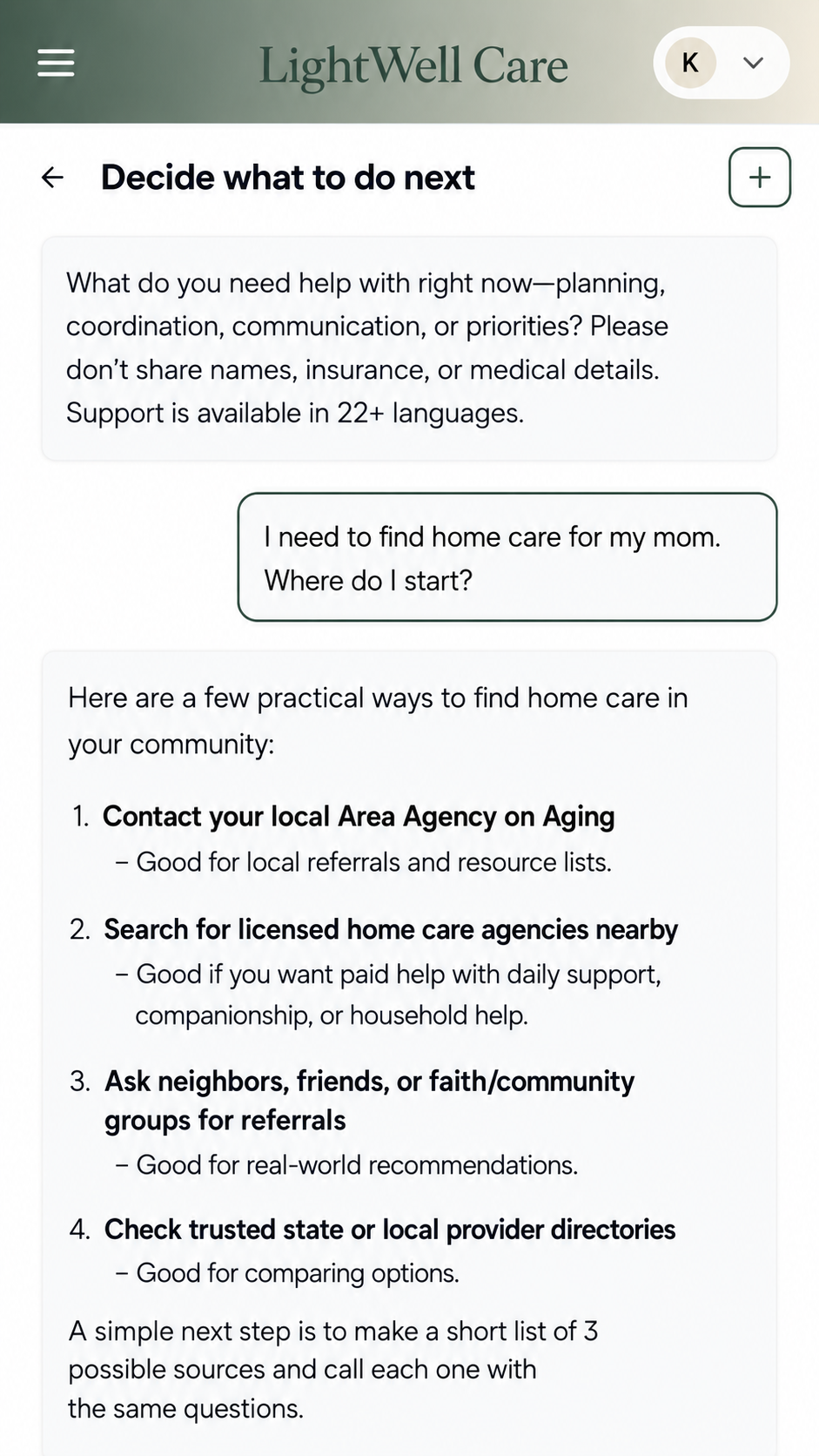
  2. 2. Ask

    A caregiver asks LightWell Care how to start finding home care for her mom, and gets a list of practical places to contact
    "I need to find home care for my mom. Where do I start?"
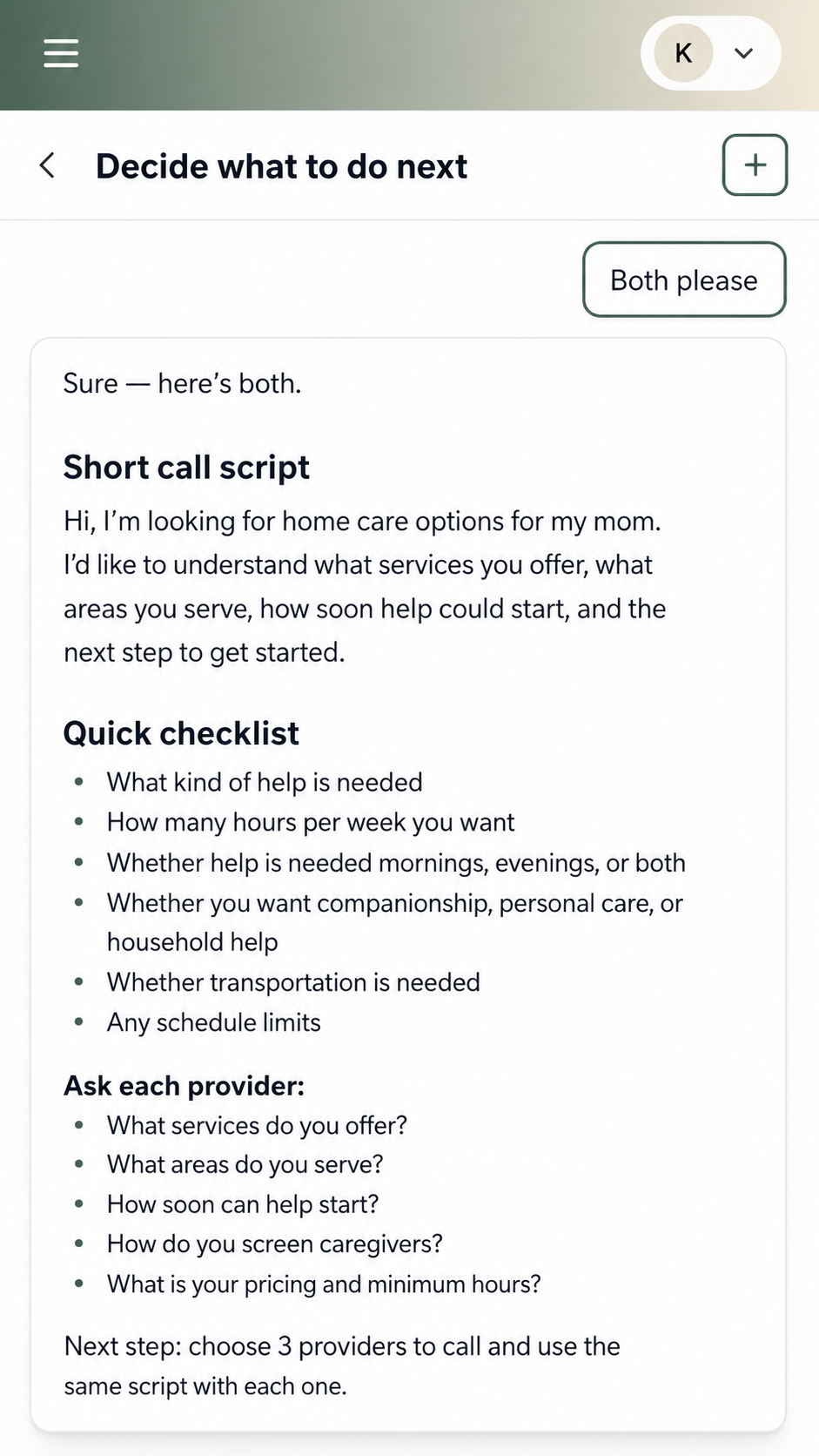
  3. 3. Act

    LightWell Care returns a short call script and a checklist of questions to ask home-care agencies, with a clear next step
    A short call script, a checklist, and a clear next step.

You do not have to know the answer, or even the right question. Start with what is happening.

Support available in 22+ languages.

Ask a caregiving question

You'll continue to the secure LightWell Care assistant app, where a separate free login is required.

Real caregiving situations

Seven everyday situations. Each one shows the question, the answer you would get back, and what happens when you ask a follow-up.

Finding care

Where do I even start?

You ask

I need to find home care for my mom. Where do I start?

LightWell Care

Three practical places to begin: your local Area Agency on Aging for referral lists, licensed home-care agencies near her address, and people who have done it already — neighbors, friends, or a faith or community group. A good first step is a short list of three possible sources and the same set of questions for each.

Family coordination

Nobody knows who is doing what

You ask

My brother and I keep losing track of who is doing what. Can you help us organize the next week?

LightWell Care

Here is a simple split for the week: one of you owns appointments and transportation, the other owns groceries, errands, and bills. Anything new goes to whoever owns that category. Add one 10-minute check-in on Sunday so the next week is set before it starts.

A hard conversation

Bringing up more help at home

You ask

I need to talk with my dad about accepting more help at home. How do I bring it up?

LightWell Care

Lead with what he wants, not with what worries you: staying in his home is usually the shared goal. Try opening with one specific thing rather than a general concern — the laundry, the driving, the yard — and ask what he would want to happen if that became harder. Keep the first conversation short and leave the decision open.

Family update

Turning notes into a message

You ask

Can you turn these notes into a short update I can send my family?

LightWell Care

"Quick update on Mom. She had a good week overall. The new aide started Tuesday and it is going well. Her next appointment is the 14th at 2pm — I am taking her. Nothing anyone needs to do right now; I will send another update after the 14th."

Example conversations, shortened for space. Not medical, legal, or financial advice.

Ask a caregiving question

You'll continue to the secure LightWell Care assistant app, where a separate free login is required.

Or try it yourself

Type a caregiving question the way you'd say it out loud. This demo shows the kind of answer you'd get — including what it won't do.

This is a demo with example answers, not medical, legal, or financial advice. The real assistant responds to your specific situation.

This demo provides example answers, not medical, legal, or financial advice. The real assistant responds to your specific situation.

Founding Member access

Founding Member access is currently open. You can use LightWell Care free during our early access period while we learn and improve the experience.

No payment information required.

After Founding Member access closes, regular pricing will be $9.99/month.

Frequently asked questions

Still deciding? See how LightWell Care caregiver support works or read more about LightWell Care caregiver support.

Start with what would help today.

Founding Member access is currently free. No payment information required.

You'll continue to the secure LightWell Care assistant app, where a separate free login is required.

View all caregiver tools